Posts

Control no longer using WinUI 2 styles when you apply a custom style to it? Here's how to fix it in XAML

Image
So you've applied your own style to a Button , TextBox , ContentDialog or any other UWP control only to find that the control has reverted to the in-built UWP styles - no longer are WinUI styles being used for the control. Gone are the rounded corners and back are various fluent design lighting effects and 3D button effects common in older versions of Windows 10. You check your custom styles and can't find any reason why the control(s) look like this and you followed the instructions on how to apply the WinUI styles to your app. Well, that's because it's not your fault - this is actually normal behaviour. Read on to see why and the quick and easy fix for it. Why this happens This actually happens due to the default behaviour of UWP. In fact, if you've used WPF (Windows Presentation Foundation), it had the same behaviour. What happens is that whenever you apply your own styles to controls, any properties not defined by the style are inherited by the built-in styles,...

How to enable better looking and easier to see WPF text selection visuals

Image
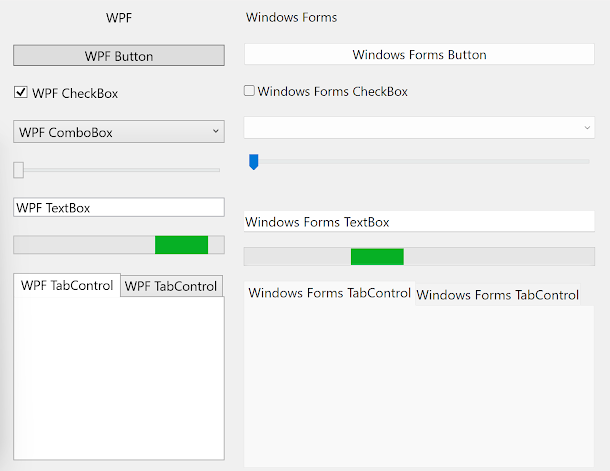
If you've ever selected text in a WPF (Windows Presentation Foundation) UI (user interface), such as through a TextBox, you've probably noticed it looks slightly strange compared to Windows Forms and WinUI text selection for example - it looks more as though the text selection colour is overlayed on top of the text rather than underneath it. The below screenshot shows TextBoxes from various different UI frameworks in Windows and as you can see, WPF is clearly the odd one out: Text selection visuals from different UI frameworks So let's fix this. In .Net Framework 4.7.2, Microsoft introduced a fix for this , which results in the text selection visual in WPF looking much more like it does in other UI frameworks. To enable this fix, all we have to do is call one line of code when our app starts up (such as in the Startup event ). C#: AppContext.SetSwitch( "Switch.System.Windows.Controls.Text.UseAdornerForTextboxSelectionRendering" , false ); VB: AppContext.SetSwitch(...

How to show a UAC shield icon in WPF and Windows Forms/WinForms in C# and VB

Image
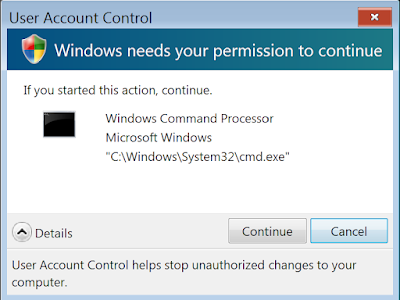
UAC or User Account Control was introduced in Windows Vista and was a feature that would limit the permissions that processes would have when running under an administrator account. Specifically, processes would have the same permissions as a standard user, even when running under an administrator account, unless the process was elevated - which, by default, would require showing a prompt to the user except for certain Microsoft processes. UAC still exists in Windows today and its behaviour can be customised in Control Panel. A User Account Control prompt in Windows Vista As you've probably seen, controls (such as buttons, links, menu items, etc.) in user interfaces whose default action requires elevation often display a little shield icon next to them. Microsoft recommends doing this in their documentation . UAC shield icons in Windows 11 Control Panel As a WPF (Windows Presentation Foundation) and/or Windows Forms developer, you might want to add this shield icon to your UI to c...

Why won't my WPF app use Windows 11 styles?

Image
Update January 2025 - The new Windows 11 themes in WPF are out! See here  for how to enable them. Note that there are various bugs with them at the moment, so it might not be a good idea to use them in a production environment. Some bugs have been fixed in .NET 9.0.1 . Update November 2024  - .NET 9 should be released soon with new themes for Windows 11. More info here . Update July 2024 - Microsoft has uploaded a WPF Gallery Preview app to the Microsoft Store which shows the new Windows 11 styles for WPF which are currently being worked on. Update 3/12/2023: Microsoft has outlined the scope of adding Windows 11 themes to WPF, you can see it on GitHub here . Additionally, the scope mentions dark mode so this is good news if you want to support dark mode in your app here. See the latest update from Microsoft on WPF's GitHub repo  here . If you've used Windows 11, you may have noticed that WPF apps still look like they did on Windows 10 and don't use Windows 11/system vis...

How to use modern icons in XAML in WPF on Windows 10 and 11

Image
Icons and symbols are a common part of modern user interfaces. Depending on your skills, creating your own icons may not be easy. Luckily, Windows 10 and 11 come preinstalled with plenty of icons that can be used in applications. If you've developed for UWP or WinUI and have used the SymbolIcon , you may have seen these icons before. By using these modern icons, you can create user interfaces that look consistent with the operating system. And the great part is that it's easy to use these icons with WPF (Windows Presentation Foundation) while supporting both Windows 10 and 11. 6 WPF buttons with modern icons in Windows 11 The same 6 WPF buttons with modern icons in Windows 10 Where the icons are stored These modern icons that Windows 10 and 11 include come in the form of fonts - specifically Segoe MDL2 Assets and Segoe Fluent Icons . Segoe MDL2 Assets is included in Windows 10 and 11 and Segoe Fluent Icons is included in Windows 11. Segoe Fluent Icons includes newer version...