Posts

Showing posts with the label C#

UWP: How to fix losing focus when a grid or other non-focusable control is clicked

Ever noticed a situation where, in your UWP app, the user clicks an empty area in a page or other non-focusable control, and then all of a sudden the whole page loses focus, completely breaking any KeyDown or PreviewKeyDown events you've set up? Never remember this happening with WPF and Windows Forms?  That's because this is new behaviour with UWP - where, if you click on an empty space, focus will go all the way back to the root ScrollViewer which houses all your content - this ScrollViewer is provided by the platform and not something you can control. Luckily, this issue can be easily fixed by overriding the page's pointer event handling. This was reported here and fixed in WinUI 3, but not UWP. The fix To fix this, we can override the page's handling of pointer events, to stop the default behaviour where it passes focus on to the root ScrollViewer. Let's first add the event handler for the PointerPressed event and set a background (note that you can set the back...
Quick fix for 'Unrecognized configuration section system.diagnostics' error in .NET apps

.NET can be used to create a variety of different types of app, coming with various technologies such as WPF and Windows Forms to help you create them. .NET apps support providing a .config file with the app that can be used to store various bits of configuration information about the app. There is an issue, however, that you might encounter when adding this file to your project (either manually or automatically, such as when you create a .settings file). The issue is that this file can cause a System.Configuration.ConfigurationErrorsException exception, with an error message that starts with something like 'Unrecognized configuration section system.diagnostics'. Luckily, there is an easy fix for this issue which simply involves adding a single line of code to your config file. The Fix So, to fix the issue, first open your project's configuration file (it will probably be named app.config or something like that) and add the following line under <configSections>: < ...

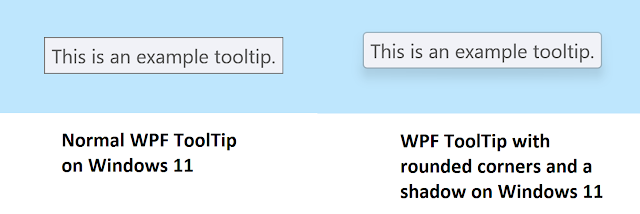
WPF: How to enable shadows and rounded corners on ToolTips in Windows 11

Image
Windows 11 originally came out in 2021, however, an official Windows 11 theme has not yet been released for WPF (more on that here ). Because of this, WPF apps still have more of a Windows 8/10 look. Luckily, there are some easy things you can do to modernise your WPF user interfaces . You could of course, create your own custom styles, however this can take quite a bit of work. This article covers something that can be done easily, without much work and without breaking compatibility with older operating systems. Enabling shadows and rounded corners on ToolTips WPF presents its ToolTips in seperate top level windows. This allows them to easily show on top of other content and not be limited to the size and position of its parent window. Windows 11 includes a built in feature as part of the DWM (Desktop Window Manager) that rounds top level windows. You can control this feature using the DwnSetWindowAttribute Windows function. Using this function, we can tell Windows 11 to have the DW...