Posts

Showing posts with the label XAML Islands

WinUI app crashing when you scroll? Here's how to fix it

Years ago, Microsoft introduced this bug in WinUI 2, which can cause WinUI 2 apps to crash then you scroll to the bottom of a scrollable area in a ScrollViewer. You may have noticed this bug in built-in Microsoft apps such as the Microsoft Store, as they use WinUI. This bug was partially addressed in Windows 11, but can still occur.  Luckily, the bug only occurs with WinUI 2 and not plain UWP, so, to fix it, we can just use the UWP ScrollViewer style instead. To do this, just apply a blank style to all or just the offending ScrollViewers like so: <Style TargetType="ScrollViewer"/>  When you create your own style, it inherits from the UWP styles instead of the WinUI 2 styles, as explained here . You could apply it to an individual ScrollViewer like this: <ScrollViewer.Style> <Style TargetType="ScrollViewer"/> </ScrollViewer.Style> Or all of them in App.xaml like so: <Application.Resources> <controls:XamlControlsResources> ...

Packaged .Net Core app that uses XAML Host not building? It's a known issue - here's how to fix it.

Image
The XAML Host is a powerful control that allows you to easily use UWP and WinUI 2 controls in a non-UWP application using the XAML Islands feature introduced in Windows 10 1903. Many Microsoft applications use XAML Islands, such as Notepad , Paint , Windows Terminal , the Windows Taskbar, Magnifier, File Explorer and more. Many of our applications using XAML Islands as well such as Codly , LaserCursor , KeepOn , QPad and more . The advantage of XAML Islands, is that you can use modern controls in a non-UWP application, allowing for various things such as better touch support and dark mode support. The XAML Host control makes using XAML Islands in .Net Core and .Net Framework applications easy. Unfortunately, there's an issue with newer versions of Visual Studio 2019 and all versions of Visual Studio 2022 that can prevent packaged applications that use the XAML Host not to build. About the issue If you follow Microsoft's documentation for a packaged app in ' Use XAML Island...

Fix ComboBox displaying incorrectly in ViewBox in UWP/WinUI 2 in XAML, C# and VB

Image
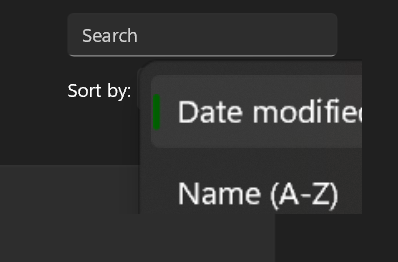
The ComboBox is a commonly used control that can be used for selecting items from a drop down list. Unfortunately, there is a bug in UWP that causes UWP and WinUI 2 ComboBoxes not to display correctly when opened if the ComboBox is inside a ViewBox. The ComboBox's drop down  menu might appear too large or too small and it might appear blurry and/or cut off as well. Here is an example of what it might look like: As you can see in the above screenshot, the ComboBox's drop down menu appears too large, blurred and cut off. What causes this? This issue is caused by a new feature introduced in Windows 10 1903 called ShouldConstrainToRootBounds. ShouldConstrainToRootBounds is a property that determines if a popup should show within its XAML root, or in a separate top level window. By showing the popup in a top level window, rather than in its XAML root, the popup is able to go beyond the bounds of its XAML root. Practically, for a standard UWP app, this means that a popup can display ...

How to enable dark title bar in WPF and Windows Forms/WinForms apps in C# and VB

Image
Windows has had a dark mode feature for a long time now, however, as a Windows Forms and/or WPF (Windows Presentation Foundation) developer, you may have noticed that the Windows dark mode does not affect your app at all automatically - in fact the Windows dark mode only automatically affects UWP, WinUI and Chromium based user interfaces - there's no support for Windows dark mode in Windows Forms and WPF. Tip: If you want to set the title bar's colours to any colours you want instead of just light or dark, follow this guide here . Luckily, it is very easy to determine if dark mode is currently enabled and be notified any time dark mode is switched on or off - from there it's just a matter of updating your UI to match which mode Windows is in. While this may work fine for the client area of your app (i.e. the area of your app that does not include the title bar and border), you don't have a lot of control over the non-client area of your app and you'll notice that by...